ContentsStart0%
Voiding an invoice, but the AI wants to pay
Imagine asking an AI assistant to void an invoice. It reads your request and, instead of telling you it can't, proposes calling a “submit payment” tool. Something is clearly off: you want to cancel an accounting entry, and the AI is about to create a payment. What went wrong? LS-Labs found in testing that when two tools were both described as “handles invoice-related requests,” but one could only check payment status while the other would actually submit a payment, the model could confuse their purposes.
A human reading the full API documentation can usually work out what a tool really does from other information. A model, though, may see two tools as nearly identical if the names, descriptions and parameters do not clearly separate their capabilities. In this test's four “void invoice” cases, the model proposed the payment tool every time. That is the starting point for TCC (Task–Call Contract), the framework LS-Labs proposes. The research checks more than whether an AI can find a plausible-looking tool: it also checks whether the AI understands the tool's capability boundaries, can fill in the right parameters, and, after getting an execution result, knows whether the task was actually completed.
Across 152 bilingual API tests, once the read-only and write purposes of the tools were clearly separated, unwanted write proposals fell from 12 to 0; after the meanings of the returned status codes were defined, passes on result interpretation rose from 12/28 to 28/28. These results suggest that the quality of tool definitions may directly affect the model's operating judgment. However, the experiment only observed the calls the model proposed and how it interpreted results; it never actually executed a payment or booking, so the improvement cannot yet be read as a gain in real transaction success rates.
AI tool use has to clear at least five checkpoints
When a user asks an AI to check restaurant availability, change an order or handle an invoice, it looks like a single tool call, but several separate judgments sit behind it. First, the AI must be able to see a suitable tool. Next, it must decide which tool fits the request and turn the information the user gave into call parameters. After the tool runs, the model still has to understand the returned result before deciding how to report back. If any one of these steps goes wrong, the final answer can disagree with the actual state.
| Checkpoint | Question to confirm |
|---|---|
| Candidate visibility | Which tool definitions did the model actually receive before it decided? |
| Tool selection | Which tool did the model choose? Should it have asked a follow-up first, or not called anything at all? |
| Call parameters | Do the branch, date, party size or invoice number match what the user asked for? |
| Execution and interpretation | Did the back end run successfully? Did the model correctly understand results such as success, no data found or timeout? |
| Task completion | Was the user's goal achieved? Is there a matching back-end record to confirm it? |
Take checking restaurant availability. Even if the model picks the right lookup tool, it may still enter “main branch” where the user said “Xinyi branch.” If the tool returns a connection timeout and the model answers “there are tables free at six in the evening,” the user still ends up with wrong information. What makes this harder is that such problems do not necessarily produce an obvious technical error. The tool may respond normally and the model may write a fluent reply, yet the task the user handed over is not done correctly. Tool optimization therefore cannot look only at whether a call succeeded; it also has to check whether the model's judgment at each checkpoint was reasonable.
What goes wrong when a tool description is unclear?
This study deliberately left two kinds of gaps in the tool definitions to see how the model would react. The first occurs before the call and mainly concerns unclear capability boundaries. For example, checking payment status and submitting a payment are entirely different operations: the former only reads data, while the latter can change the accounting state. If both tools are described as “handles invoice-related requests,” the model has to guess which one fits better. With overlapping descriptions, 8 of the 16 read-only queries across the restaurant and invoice scenarios were proposed to a write tool; conversely, 8 of the other 16 write requests that the user had already confirmed were proposed to a read tool.
This means the model might not only do something it should not, but also fail to complete the task it was supposed to carry out because it picked the wrong tool. The second kind occurs after the call, where the problem is return results without clear semantics. Suppose a tool returns HOLD_7, but its definition does not explain whether the code means a temporary hold, a successful operation or some kind of failure. The model may guess from the code name, or try to infer from the conversation, and then turn the guess into a confident-sounding answer. The test removed the status-code definitions. Among 24 requests that used valid status codes, 16 were inferred by the model directly as a particular status instead of admitting that the available information was insufficient.
For users, this is especially hard to notice. The system reports no error and the AI does give an answer; the answer simply has no reliable basis. Both problems point to the same thing: besides introducing what a tool does, a tool description has to help the model understand the conditions for use and the meaning of results. A complete tool contract should at least state which tasks the tool applies to, which preconditions and parameters it needs, and how each execution result should be read. In other words, the model needs to know not only “how to call” but also “what counts as success after the call, and what should make it stop.”
From TSO to TCC: building a tool contract you can verify
In the earlier TSO (Tool Selection Optimization) research, the focus was how an AI discovers tools, understands their purposes and chooses among a list of candidates. But even when the model picks the right tool, the user's task is not guaranteed to finish smoothly. For example, the AI may choose the right lookup tool but enter the wrong invoice number, or fill in every parameter correctly but mistake a timeout response for a successful query. These problems call for a finer verification method beyond tool selection.
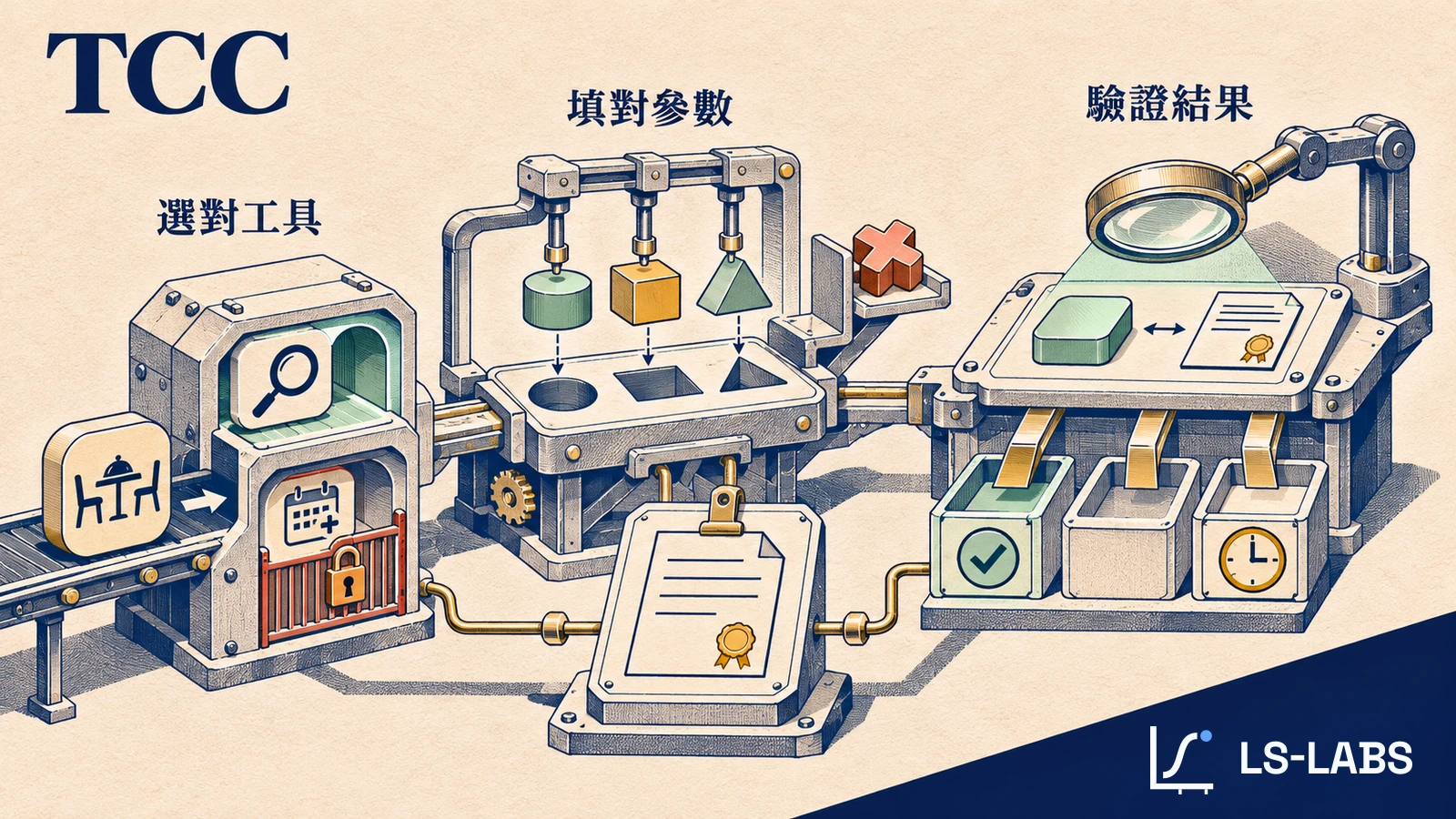
LS-Labs therefore defines TCC as a task-level verification framework that checks whether the model's tool selection, parameters, result interpretation and actual completion state match expectations. T is Task, the first C is Call (the tool call), and the second C is Contract (the verification contract). The contract is defined before testing and is used to check that the task, the call and the result agree with one another. This lets TCC cover both model behavior and back-end state, instead of relying on a single success rate.
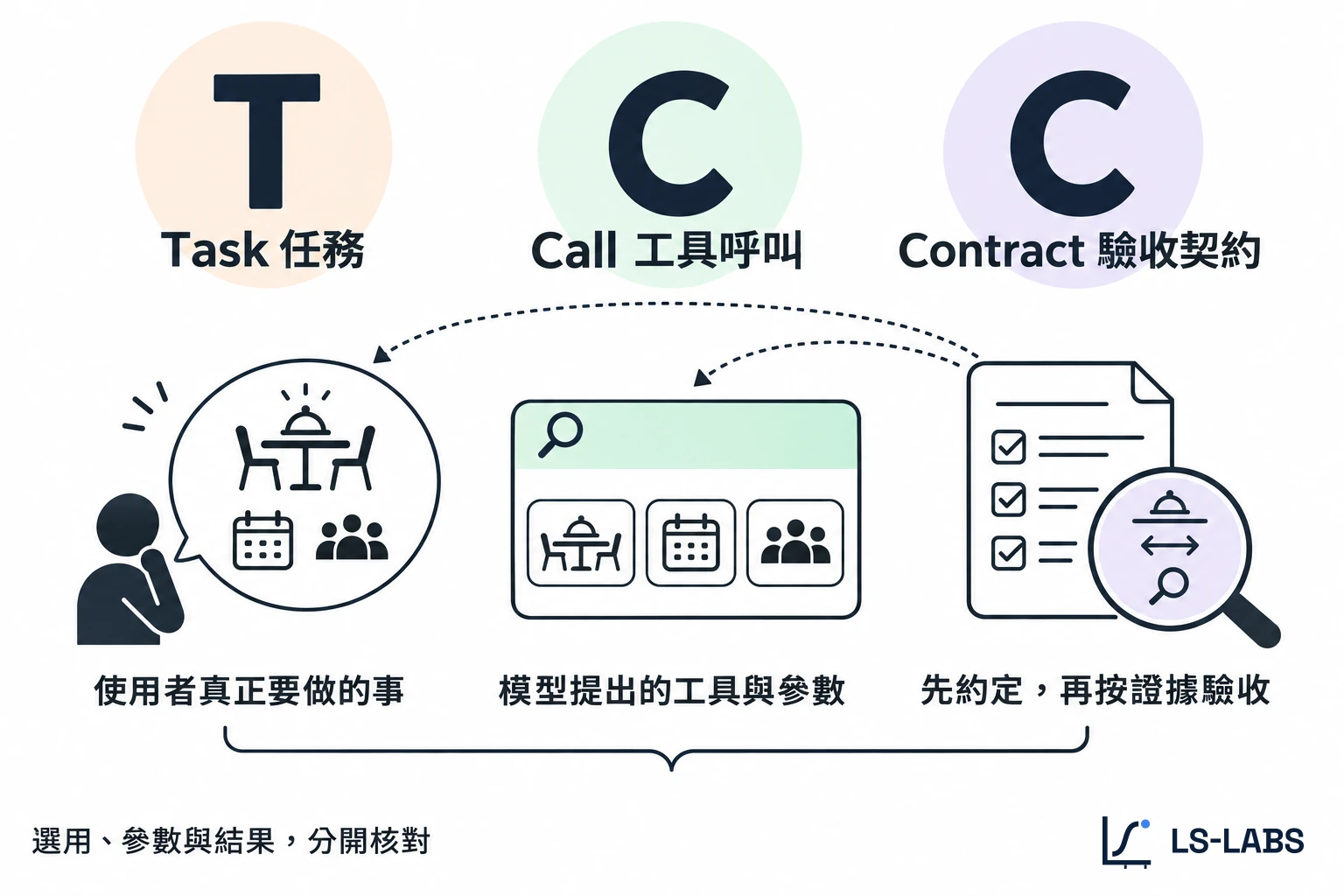
TSO focuses on how a tool is discovered and selected; TCC places selection inside the full task flow and further verifies whether the call and its result are correct. The two overlap in what they observe but operate at different levels. TCC works by building a case card for each task before testing begins. The card records not only what the user said but also fixes in advance the model version, the tool definitions and the test environment, along with the expected tool selection, parameters and returned results. After the test, each item is checked against the records actually collected. TCC splits verification into two main dimensions.
| Verification dimension | What must be defined beforehand? | How is it confirmed after testing? |
|---|---|---|
| Task fit can be determined | Which tool suits the task? When should the model ask a follow-up or stop? | For a payment-status check, choose the read-only tool; if the invoice number is missing, ask; if the request is to void but no matching capability exists, do not call an existing tool. |
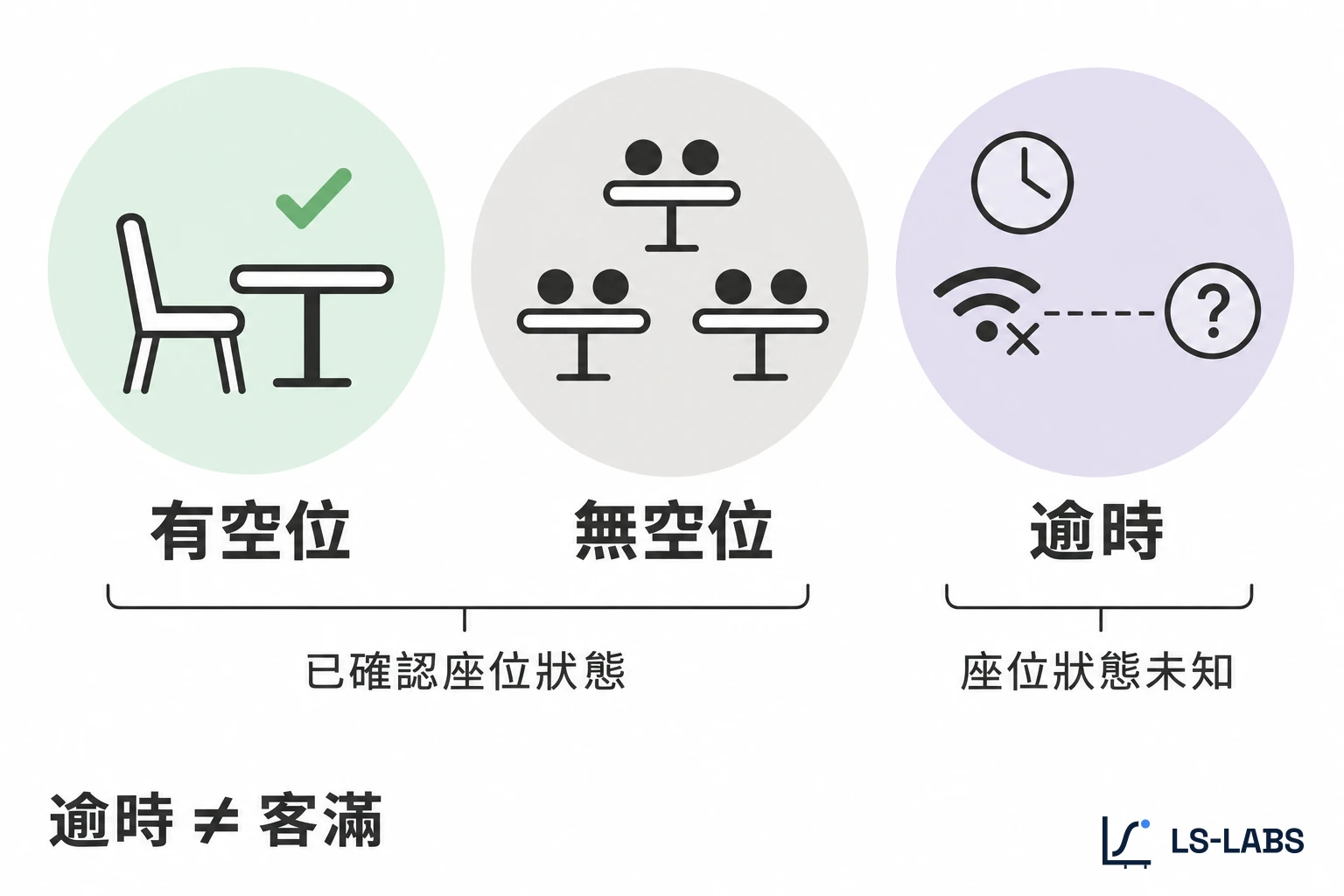
| Call and result can be verified | What should the correct parameters, return semantics and back-end state be? | Check the call parameters, the model's interpretation and the execution records; mark items with no back-end evidence as “untested.” |
One distinction matters here. A model not picking the wrong tool does not mean it actually completed the task, and a model claiming completion cannot replace the back end's execution record. TCC therefore never presumes success for items that lack observation data. Only what can be verified directly is counted as pass or fail; the rest stays “untested.” To see how tool descriptions affect recall and first choice, compare the controlled experiment that changes only the Tool Description, which separates whether a tool enters the candidate list from which tool the model finally picks.
Experiment design: 152 requests, checking tool selection and result interpretation
Can this framework help developers improve their tool definitions? To observe the effect in practice, the study designed two controlled tests, checking how the model chooses a tool before the call and how it understands return semantics after getting results. Related research has also pointed to the importance of tool description quality. For example, the study by Hasan et al. analyzed the descriptions of 856 tools across 103 MCP servers and further evaluated the relationship between description quality and task performance. For people who actually build tools, however, knowing that description quality matters is not enough; they need an acceptance method that can reproduce errors and compare rewrites.
The study therefore uses synthetic tools to build two scenarios, “restaurant booking” and “invoice accounting,” each with a vague-description version and a version with clearer capability boundaries. The experiment ran on 5 November 2026 using Gemini 3.1 Flash-Lite, testing both Traditional Chinese and English. In total, it sent 152 formal API requests. Two earlier pre-check requests and one local DNS error that occurred before reaching the provider were recorded separately and are not in the formal test denominator.
Group 1: tool-selection verification (96 requests)
This group observes whether the model can decide, from the user's needs, which tool to use. Each scenario × language combination has six tasks, covering normal reads, user-confirmed writes, missing required data and requests beyond the tools' capability. Two tool-definition versions were prepared: one in which the descriptions of the two tools overlap heavily, and one that clearly states each tool's purpose and limits. In addition, every task swaps the order of the two tools to reduce the influence of candidate order. Each condition therefore has 48 requests, 96 in total. Scoring does not only check whether the model picked the right tool. For tasks that should trigger a call, the first-choice tool and the parameters must both be exactly right; if a follow-up or a stop is needed, the model must output the preset marker.
Group 2: result-interpretation verification (56 requests)
The second group no longer tests tool selection. It fixes the lookup tool and parameters and observes whether the model correctly understands the status codes returned by the back end. Each scenario and language combination tests three valid statuses, each with two numeric codes, plus one out-of-range error code, making seven requests per group. Both conditions receive the same numbers; the only difference is whether the tool definition includes the status-code explanation. When code meanings are provided, the model should interpret according to the definition; when they are not, faced with a valid code it cannot confirm, it should report “cannot determine” instead of guessing. Each condition has 28 requests, 56 in total. Overall, these 152 requests measure the model's call decisions and its interpretation of returns; no payment or booking was actually executed.
Results: clear capability boundaries reduce wrong calls
Start with tool selection. When the two tools' descriptions were vague and overlapping, the model proposed calling the write tool in 12 of the 32 requests that should not write. After the tool definitions were rewritten to clearly separate read-only from write purposes, the same error fell to 0. In other words, the risk of overlapping descriptions is not just choosing the wrong tool but crossing straight over the line between read-only and write. This is why capability boundaries must be stated in the tool definition first, rather than left for the model to guess from context.
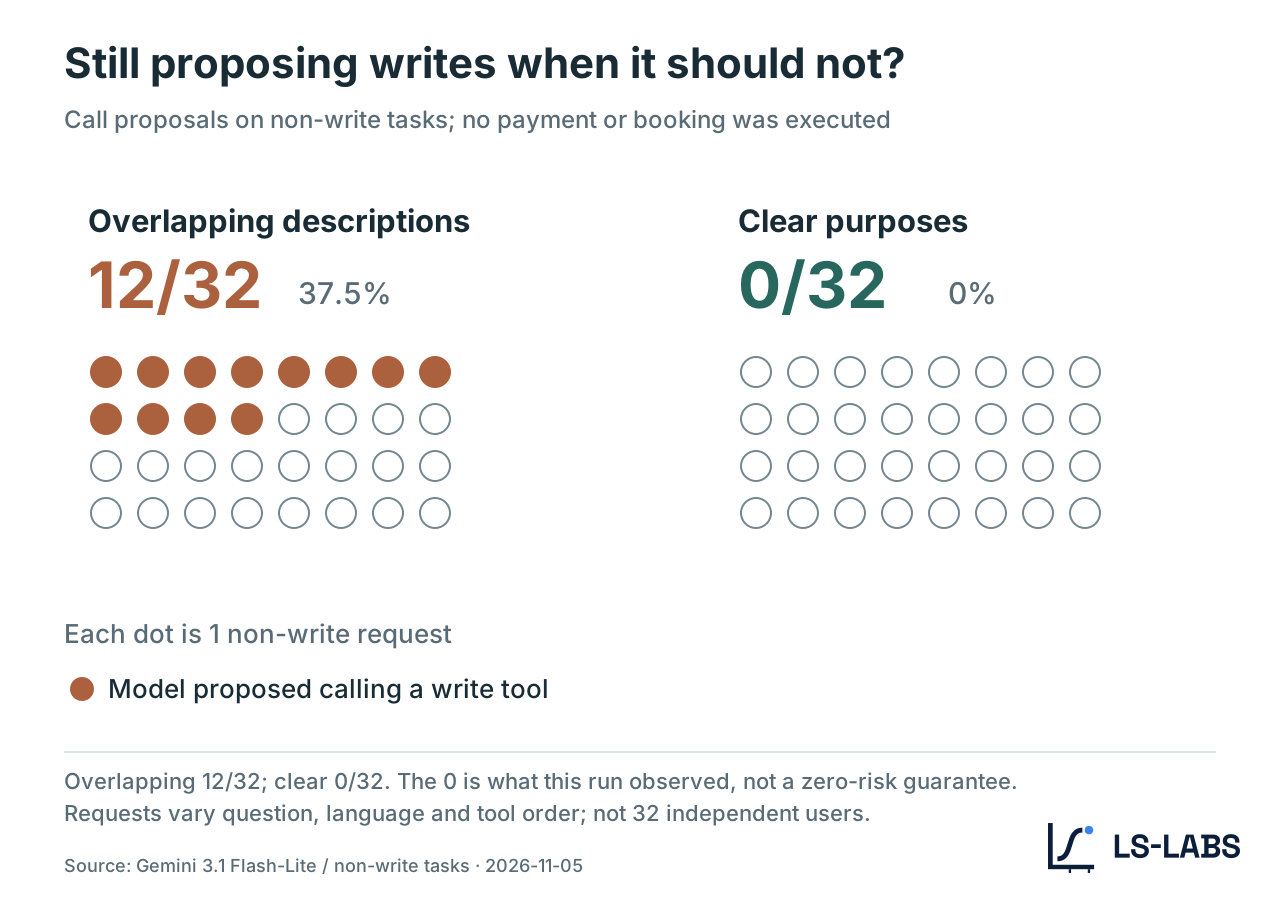
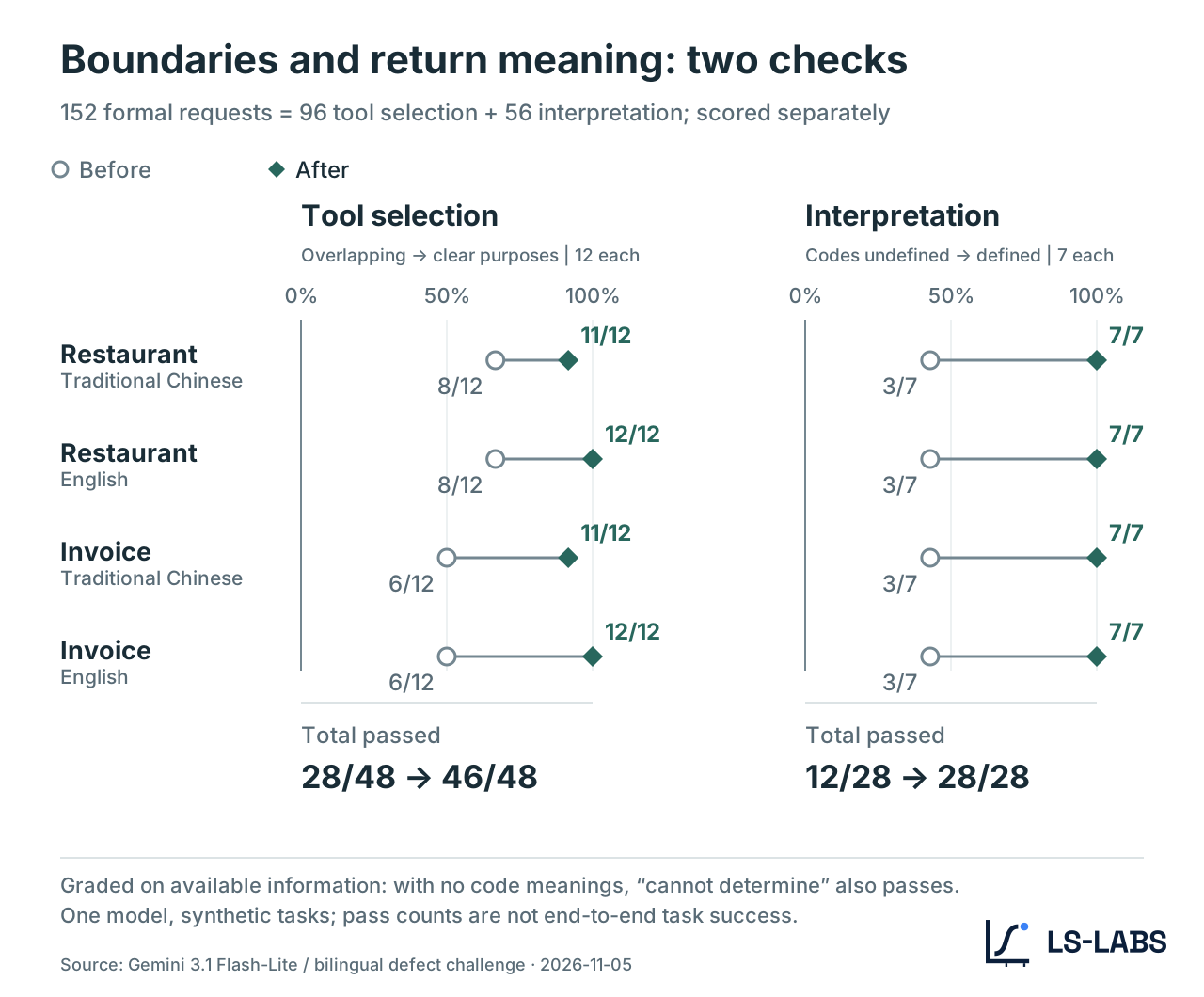
The overall selection pass count also rose from 28/48 to 46/48. This improvement is not because the model suddenly got smarter; the tool definitions state more clearly “whether to call” and “which one to call.” In other words, the contract fixes the decision boundary first, which gives the model a stable basis for judgment. Later work still needs to break down which question types benefited and which regressed, to know whether the next thing to fix is the description, the parameters or the handling rule when data is missing.
View the full data: Table 1 | Two verification paths across four scenario–language combinations
| Test scenario | Selection: overlapping descriptions → clear purposes | Interpretation: no code meanings → with code meanings |
|---|---|---|
| Restaurant / Traditional Chinese | 8/12 → 11/12 | 3/7 → 7/7 |
| Restaurant / English | 8/12 → 12/12 | 3/7 → 7/7 |
| Invoice / Traditional Chinese | 6/12 → 11/12 | 3/7 → 7/7 |
| Invoice / English | 6/12 → 12/12 | 3/7 → 7/7 |
| Total | 28/48 → 46/48 | 12/28 → 28/28 |
Across the 48 paired tests, 20 pairs improved, 26 stayed the same and 2 regressed. Both lost points were on tasks missing required information. In one, the user did not give the restaurant branch, yet the model filled in “main branch” on its own; in the other, the model asked for the invoice number in Traditional Chinese, which was correct in meaning, but did not output the CLARIFY marker the test protocol requires. This shows that a tool contract must also define what to do when information is missing, in addition to saying when the tool must not run directly. The second case, however, is closer to a protocol-format error than to a complete misunderstanding of the user's intent. This is also why TCC fixes the acceptance conditions in advance: different kinds of failure should be recorded separately, so you can tell which part actually needs improving.
Adding status-code definitions raised interpretation passes from 12 to 28
In the result-interpretation test, the gap between the two conditions is even clearer. Without status-code explanations, only 12 of 28 tests passed; once the code meanings were added, all 28 under the same conditions passed. This means that when the same set of status codes lacks semantics, the model may mistake uncertainty for certainty; the return format is not an engineering detail but the semantic interface through which the model reports correctly. Adding code meanings is therefore not just adding text; it turns “uncertainty” from the model's free guess into a state judgment that can be verified.
One example comes from an English restaurant task. The tool returned status code 17, which is defined as a connection timeout, but with no explanation available the model told the user that seats were still available. This is not simply a wording problem: the model read a system state it could not confirm as an affirmative query result. After the tool definition added the correct meaning of 17, the model reported the timeout as the contract required. These two sets of results show that improving tool descriptions is not about adding words but about giving the model the judgment basis it was missing. Capability boundaries affect whether the model should call and which tool to choose; return semantics affect how it understands the state after the tool runs. However, this rewrite changed the tool names, descriptions and related structure at the same time, and did not isolate the effect of each field. The results therefore support the improvement from rewriting the whole tool definition; they cannot yet say which single field mattered most.
In practice: redesigning a tool that checks restaurant availability
How can the findings be applied in real development? Take restaurant booking: if a tool is described only as “provides restaurant booking services,” the model can hardly tell whether it checks availability, looks up existing reservations or creates a booking directly. A better approach is to make the name, description, input and output correspond to each other, reducing what the model has to guess. This section is therefore not a copywriting demo; it rewrites the same tool's capability, input and output as a specification a model can read.
| Field | Before | After |
|---|---|---|
| Name | restaurant_service |
find_available_tables |
| Description | Provides restaurant booking services. | Looks up bookable time slots by branch, dining date and party size. Read-only lookup; does not create or modify bookings. |
| Input | query accepts a piece of text. |
restaurant_branch: full branch name; dining_date: the branch's local date, formatted as YYYY-MM-DD; party_size: a positive integer, children included. All three fields are required; if the branch is missing, ask first. |
| Output | Return format not specified. | On success, returns the time zone and a list of bookable slots; available means at least one slot, no_slots means the query succeeded but no tables are free; an upstream timeout should be reported as a tool error. |
After the rewrite, the model no longer has to infer the tool's function from the vague “booking services”; it can tell directly from the definition that this is a read-only lookup and what information it needs before calling. Two things deserve attention in real adoption. First, tool names and parameter structures may already form a compatibility contract with existing clients. If the tool is already serving external callers, renaming it or splitting fields directly may break older clients. A safer path is to ship a fuller tool definition in a new version while keeping the necessary compatibility entry point, so clients can migrate gradually. Second, results should use a clear structure wherever possible, rather than asking the model to infer from natural language or opaque codes.
Taking the MCP 2025-11-25 specification as an example, developers can define the format of structured output through outputSchema. For execution errors such as an upstream connection timeout, the tool-error mechanism should also be used explicitly, for example isError: true, so they are not conflated with “the query succeeded but no tables are free.” It must be stressed that tool descriptions cannot replace back-end validation. Input format, user permissions and the actual scope of writes must still be checked by the server. What TCC does is give the model and the developer a shared basis for judging correct behavior; it does not hand system security over to the model.
Before launch, build a TCC case card for your tool
Developers who already run a tool service do not have to redesign their whole API to start testing. A more practical approach is to pick one concrete task from existing usage, build a case card first, and confirm whether the model operates as expected. For example, the user asks: “Is there a table for four at Sea Breeze Eatery, Xinyi branch, on 15 January 2027?” The sentence looks simple but contains three pieces of information that must be passed correctly: branch, date and party size. If the model picks the right tool but fills in a different branch, it should still be judged a parameter error. If the back-end query times out, the model should not answer that a table is available. A basic TCC case card can start by recording the following.
| Case card field | Content defined in advance |
|---|---|
| Capability evidence | Attach code or test records showing the tool really has read-only access, and mark the claim as verified, unknown or contradicting the description. |
| Task and environment | Keep the full task text, locale, model and client versions, tool definitions, candidate order, and the authorization and simulated data used for testing. |
| Expected selection | Call find_available_tables exactly once; do not create a booking. |
| Expected parameters | The branch is “Sea Breeze Eatery, Xinyi branch,” the date is 2027-01-15, and the party size is the integer 4. |
| Expected interpretation | If the simulated result shows a table at 18:30 local time, the model must report that slot correctly; on a timeout it must not claim a table is available. |
| Expected state | Booking data must be unchanged before and after the query, confirmed by back-end records. Items without evidence are marked “untested.” |
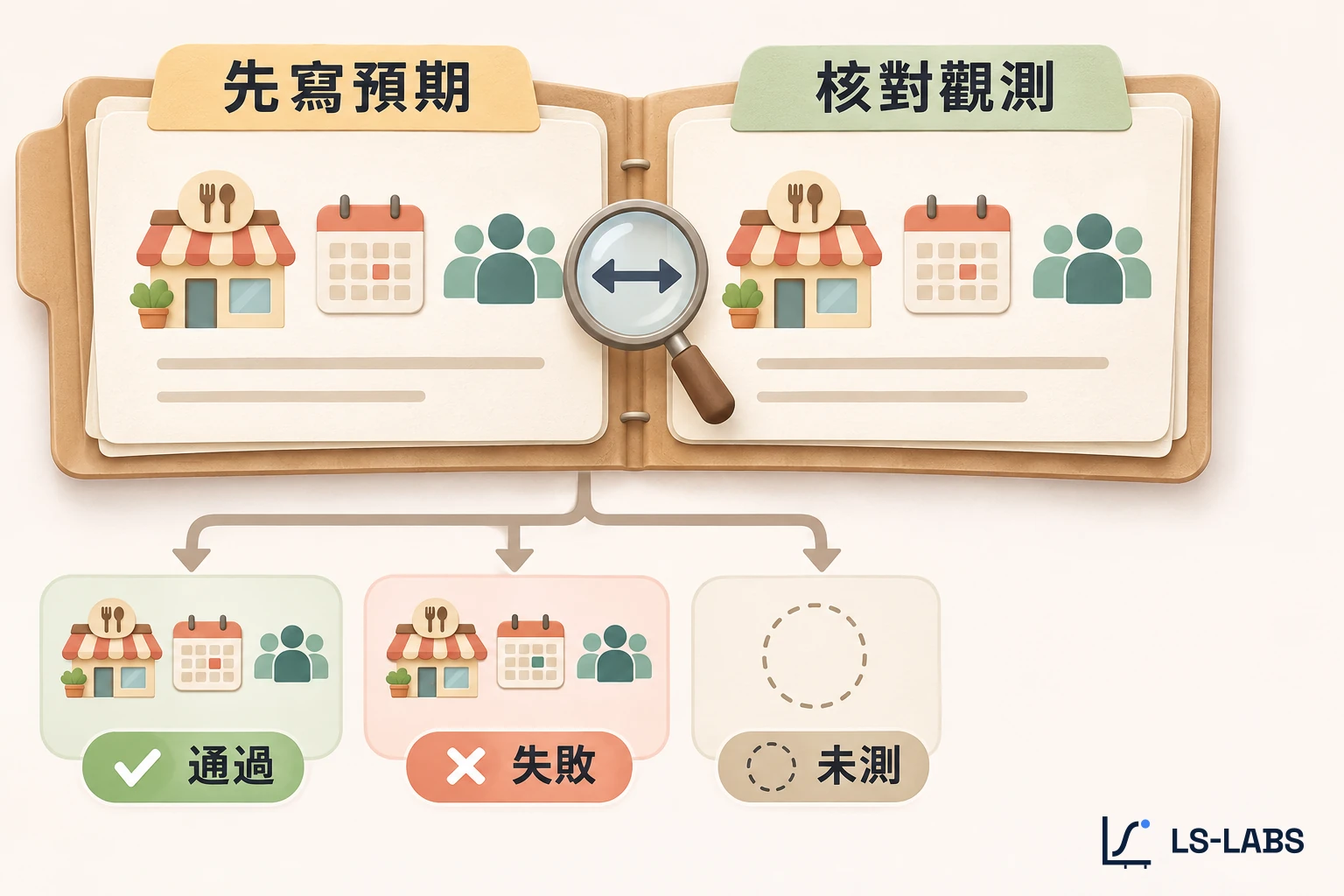
To test the case where the user forgets to give the branch, create a separate case card that sets the expected behavior to asking for the branch first and requires zero tool calls. The benefit is that different errors can be observed separately, instead of attributing every failure to “the model did not understand the request.” In other words, a case card is not one more document; it fixes the expected behavior, the tolerance and the failure categories up front, so results are not explained after the fact. That is what lets the same card be compared repeatedly across versions and across models.
A copyable TCC JSON template
Expand the JSON case card, example observation and comparison command
Below is a general-purpose case card, using a lookup of record DEMO-001 as the example.
Fill in expected before the run to fix the correct behavior, and save the model's actual calls and the back-end observations separately. This allows expected and actual results to be compared, and prevents adjusting the scoring criteria to the model's performance after the test is done.
{
  "tcc_version": "0.1",
  "case_id": "example-read-record",
  "locale": "zh-TW",
  "task": "Check the status of record DEMO-001.",
  "context": {
    "client": "Fill in the client and version",
    "model": "Fill in the model and settings version",
    "tool_set_ref": "Fill in the tool definition version or SHA-256",
    "fixture_ref": "Fill in the frozen test data, authorization, returns and before/after state",
    "mode": "fixture"
  },
  "evidence_gate": [
    {
      "claim": "The lookup tool only reads records.",
      "evidence_ref": null,
      "status": "unknown"
    }
  ],
  "checks": [
    {
      "id": "tool-choice",
      "axis": "task_fit",
      "condition": "Only look up the specified record",
      "expected": {
        "decision": "read",
        "call_count": 1
      }
    },
    {
      "id": "arguments",
      "axis": "call_result",
      "condition": "Lookup tool fixed",
      "expected": {
        "arguments": {
          "record_id": "DEMO-001"
        }
      }
    },
    {
      "id": "result",
      "axis": "call_result",
      "condition": "The lookup times out and the status cannot be confirmed",
      "expected": {
        "label": "TIMEOUT"
      }
    },
    {
      "id": "state",
      "axis": "call_result",
      "condition": "Compare write records before and after execution",
      "expected": {
        "write_count": 0
      }
    }
  ]
}
An observation JSON produced by a real run can use the check IDs as keys, for example:
{
  "tool-choice": {
    "decision": "read",
    "call_count": 1
  }
}
In the LS-Labs research workspace, you can use Node.js 24 to run the following command and compare the case card with the actual observations:
node research/tool-metadata-framework-2026-11-05/tcc/replay-tcc.mjs --compare my-card.json observations.json
The comparison script marks items with no observation data as “untested” instead of counting them as passes. Whether the tool actually ran and whether the back end changed state also each need their own evidence.
Adding TCC to pre-launch tool checks
Beyond individual case cards, LS-Labs suggests developers check at least four areas before a tool launches or changes. The order of the four checks first lowers the risk of accidental triggers, then handles missing data, exceptional states and version comparison. Testing only normal success cases easily overestimates how complete a tool definition is and hides how the model fails at the edges; the four should therefore run together, rather than picking one as the final check before launch. In other words, the checklist is not a pre-launch formality; it carries the tool contract from documentation into a repeatable test process.
Test easily confused tools together. Put a read-only lookup and a write tool that modifies data in the candidate list at the same time, covering normal operations, missing required data and requests beyond capability, and confirm whether the model can tell them apart.
Verify that the back end can reject invalid operations. In a test environment, confirm the server blocks missing fields, malformed parameters and unauthorized writes. Even when the parameters the model provides are well-formed, check whether they match what the user actually asked for.
Test success, no data and execution failure separately. For example, a restaurant lookup should be simulated with tables available, no tables and a connection timeout, to see whether the model tells them apart. For tasks that write, also check the back-end state before and after execution.
Keep test conditions identical before and after a change. Fix the tasks, model settings, tool candidate order and test data, and keep the raw requests, model responses and back-end records. Score selection, parameters, interpretation and task completion separately so a single success rate does not hide different kinds of problems.
If the task involves booking, payment or modifying data, the acceptance conditions need to be stricter. At minimum, confirm that the user authorized the operation, that the back-end state matches expectations, and that what the AI tells the user matches the actual state. If any of these lacks evidence, the task should not be judged complete. This is also why TCC keeps “untested” as its own status instead of counting items without evidence as passes. Without back-end state or authorization records, a fluent reply from the model cannot stand in for verification.
Getting AI to find the tool is only the start of the task
Back to the invoice at the start. The user wanted to void an invoice and the AI proposed submitting a payment, which reflects capability boundaries that were not clear enough. The model does not know which operations are currently allowed, and cannot confirm which tool truly matches the user's purpose. When tool definitions clearly separate read-only from write and say what to do when data is missing, the model has less to guess. When return statuses also have explicit semantics, the AI can report more reliably how far the task actually got. In this test, tool-selection passes rose from 28/48 to 46/48, and result interpretation from 12/28 to 28/28. These numbers do not guarantee that tasks will succeed in production, but they show that many problems that look like model misjudgments can be eased by improving tool definitions.
As AI takes on more real tasks through tools, what developers need to watch is no longer just how to get models to find their service. TSO studies how AI chooses tools; TCC goes further to confirm that the chosen tool is used correctly and that the task result can be verified. Being chosen is a starting point. What deserves verification is whether the thing the user handed over was handled correctly. If the flow also involves web actions, delegated authorization and transaction confirmation, read the booking experiment that approaches AX through affordances to check completion conditions beyond tool calls.
Topic reading: TSO reading guide · Homepage AI search globe
Research data and sources
- LS-Labs (2026-11-05). Bilingual defect challenge for restaurants and invoices. Review record with samples, grouped results and limitations. Research ID:
tool-metadata-transfer-2026-11-05. - Anthropic. Claude tool search documentation. Used to explain when deferred-loading tools are provided to the model.
- LS-Labs (2026-11-05). Task–Call Contract v0.1. Review record for the glossary entry, template and four case cards.
- LS-Labs (2026-11-05). Equal-length tool description control. Research ID:
tool-description-length-control-2026-11-05. - Hasan et al. (2026). Model Context Protocol (MCP) Tool Descriptions Are Smelly!. arXiv preprint; Table 7 lists the differences in task success rates.
- Model Context Protocol (2025-11-25). Tools specification. Referenced for output schemas, tool errors and server-side validation.